Have you ever wondered if you can power your laptop directly with a portable solar panel? Imagine working outdoors, away from any power outlet, yet still keeping your laptop charged and ready.
It sounds like a game-changer, right? But is it really that simple? You’ll discover how portable solar panels work with laptops, what you need to know before trying it yourself, and the tricks to make sure your device stays powered up no matter where you are.
Keep reading to find out if this green energy solution can truly meet your laptop charging needs.

Credit: www.amazon.com
How Portable Solar Panels Work
Portable solar panels capture sunlight and turn it into usable power. They provide energy on the go. This makes them useful for charging devices like laptops. Understanding how they work helps you use them better.
Portable solar panels rely on basic solar technology. They are small, light, and easy to carry. These panels convert sunlight into electricity through a simple process.
Solar Panel Basics
Solar panels have many small units called solar cells. These cells are made from materials like silicon. They absorb sunlight and create an electric current. This current is direct current (DC) electricity.
The size and number of cells affect the panel’s power output. More sunlight means more electricity. Portable panels work best under bright, direct sunlight.
Energy Conversion Process
Sunlight hits the solar cells and excites electrons inside them. This movement of electrons creates electricity. The electricity flows through wires to a device or battery.
Most laptops need specific voltage and current. Portable solar panels often connect to a power bank or adapter. This device changes the electricity to the right type for your laptop.
Without this step, the solar panel’s power may not be safe or usable. The process ensures your laptop gets steady and correct power.
Laptop Charging Requirements
Laptops need specific power to charge safely and work well. Portable solar panels can give power, but it must match the laptop’s needs. Knowing the right power and connector helps you charge without trouble. This keeps your laptop safe and working longer.
Power Specifications
Every laptop needs a certain voltage and current to charge properly. Usually, laptops require 19V or 20V, but some use 12V or 24V. The solar panel must provide the right voltage. Too high or too low voltage can damage the laptop.
Amperage is also important. It shows how much current the laptop needs. Most laptops draw between 2 to 4 amps. The solar panel should supply equal or higher amps to charge efficiently. Lower amps mean slow charging or no charging.
Connector Types
Laptop chargers use different plug types. The solar panel’s output must fit the laptop’s power port. Common connectors include barrel plugs, USB-C, and proprietary plugs.
USB-C is popular in new laptops. It supports fast charging and data transfer. Older laptops may use round barrel connectors. Some brands have unique connectors not compatible with others.
Using the wrong connector can prevent charging or cause damage. Adapters or special cables may be needed to connect solar panels to laptops.
Compatibility Between Solar Panels And Laptops
Compatibility between portable solar panels and laptops is key to charging success. Not all solar panels work well with every laptop. Understanding how to match them ensures safe and efficient charging. Two main factors affect compatibility: voltage and current matching, and connector compatibility.
Voltage And Current Matching
Laptops require a specific voltage to charge safely. Portable solar panels must supply the same voltage as the laptop’s charger. Too high voltage can damage the laptop. Too low voltage will not charge the battery.
Current also matters. Solar panels must provide enough current to meet the laptop’s needs. If the current is too low, the laptop may charge very slowly or not at all. Check the laptop’s power adapter for voltage and current ratings. Match these numbers closely with the solar panel’s output.
Connector Compatibility
Different laptops use different power connectors. The connector from the solar panel must fit the laptop’s charging port. Using the wrong connector can cause poor contact or no charging.
Many solar panels come with multiple adapter tips. Choose the one that fits your laptop. Some users prefer USB-C solar panels, as many new laptops support USB-C charging. Always verify the connector type before buying a solar panel for your laptop.

Credit: jmhpower.com
Direct Charging Methods
Direct charging methods offer a simple way to power your laptop using portable solar panels. These methods connect the solar panel straight to the laptop, avoiding extra devices. This reduces energy loss and increases charging speed. Two common direct charging methods are USB-C Power Delivery and DC output charging.
Using Usb-c Power Delivery
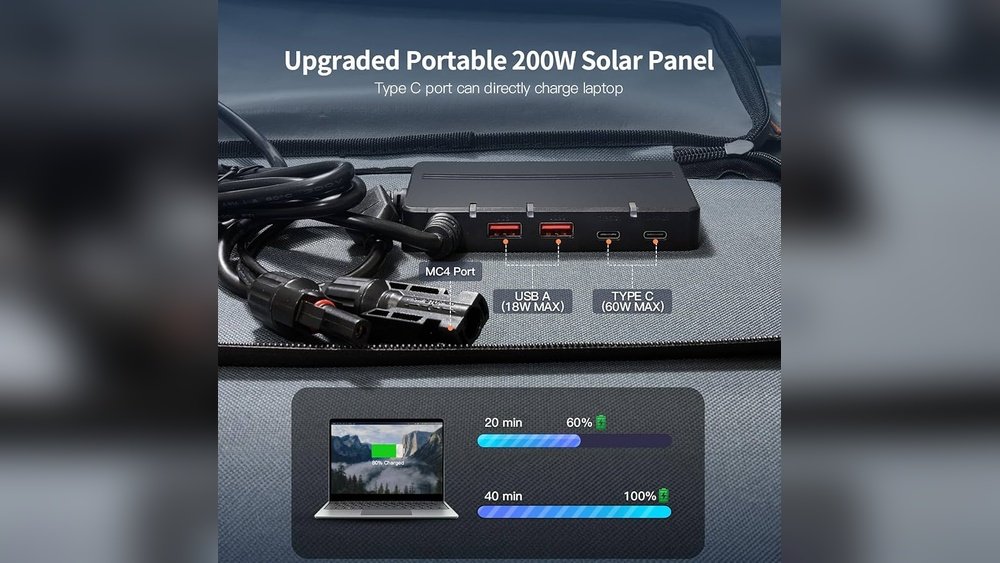
USB-C Power Delivery (PD) is a fast and efficient way to charge laptops. Many newer laptops support USB-C PD, allowing them to receive power directly from compatible solar panels. These panels have USB-C ports that deliver the right voltage and current. USB-C PD adjusts power output automatically, protecting your laptop’s battery.
This method needs a USB-C cable and a solar panel with PD support. It is simple to use and does not require extra adapters. USB-C PD is ideal for laptops with USB-C charging ports and smaller solar panels.
Dc Output Charging
DC output charging uses the solar panel’s direct current (DC) port to charge laptops. This method requires a cable that fits the laptop’s DC input. Many portable solar panels come with various adapters for different laptop models.
This charging method delivers stable power and works well with laptops lacking USB-C ports. It may need a solar charge controller to regulate voltage and prevent damage. DC output charging is common for older laptops and models with special power connectors.
Role Of Charge Controllers And Adapters
Portable solar panels produce electricity from sunlight. This power is not always stable or safe for your laptop. Charge controllers and adapters play a key role in managing this energy. They protect your devices by controlling the flow of electricity. These tools make sure your laptop charges correctly and safely.
Without these devices, your laptop could get damaged. They help convert the solar power into a usable form. This section explains how charge controllers and adapters prevent overcharging and regulate voltage.
Preventing Overcharging
Charge controllers stop your laptop battery from overcharging. Too much power can harm the battery and reduce its life. The controller cuts off the power when the battery is full. This keeps your laptop safe and extends battery life. It ensures the solar panel does not send more electricity than needed.
Voltage Regulation
Solar panels may produce fluctuating voltage. Laptops need steady voltage to charge properly. Adapters adjust the voltage from the solar panel to a stable level. This protects your laptop’s internal circuits. Voltage regulation prevents damage caused by spikes or drops in power. It keeps the charging process smooth and reliable.
Credit: sunslice-solar.com
Portable Solar Panel Limitations
Portable solar panels offer a green way to power devices like laptops. They provide energy from the sun without wires or plugs. Yet, these panels have limits that affect how well they charge laptops directly. Knowing these limits helps set the right expectations.
Understanding these boundaries can guide you in choosing the right setup for your needs. Here are key limitations to consider.
Weather Dependency
Sunlight is the fuel for solar panels. Clouds, rain, or fog can block sunlight. This reduces the energy the panel produces. Less energy means slower or no charging for your laptop. Early mornings and late evenings also bring less sunlight. The panel’s power drops during these times. Weather changes are unpredictable, making solar power less reliable.
Power Output Constraints
Portable solar panels have limited power output. Most small panels produce between 10 to 100 watts. Laptops usually need 30 to 60 watts to charge efficiently. If the panel’s power is too low, it can’t charge the laptop directly. Some laptops require stable voltage and current. Solar panels may not provide this without extra devices like power banks or inverters. These constraints mean you might need backup power sources.
Practical Tips For Charging Laptops
Charging a laptop with a portable solar panel can be tricky. It needs the right steps to work well. Following practical tips helps make charging faster and safer. These tips also protect your laptop’s battery and the solar panel itself.
Optimizing Solar Panel Placement
Place the solar panel where it gets full sunlight. Keep it facing the sun directly. Avoid shadows from trees or buildings. Adjust the angle as the sun moves. This keeps the panel working at its best. Clean the panel surface regularly to remove dust. A clean panel collects more energy.
Using Power Banks As Intermediaries
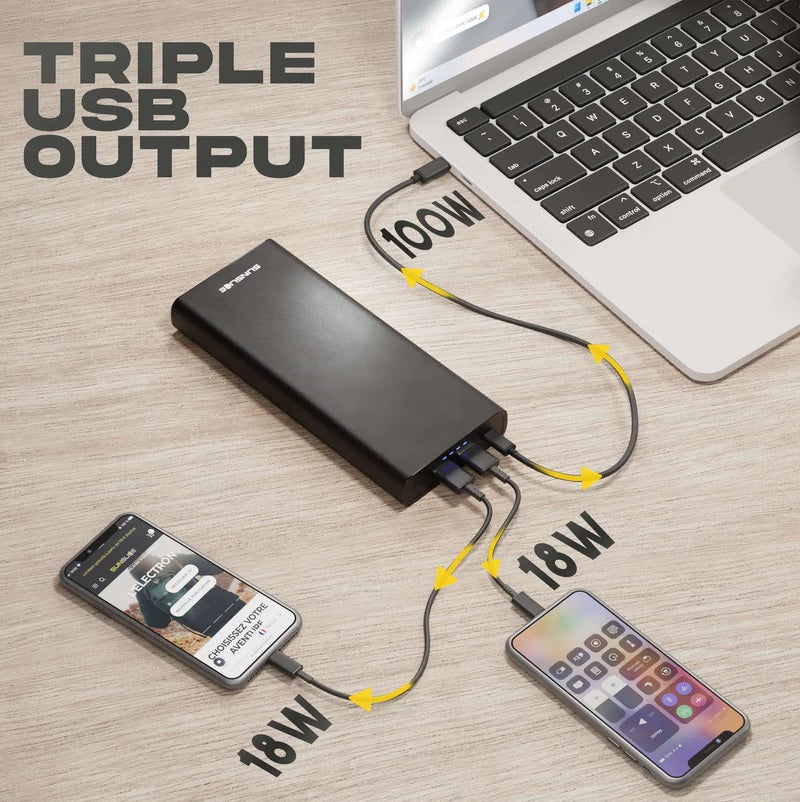
Connect the solar panel to a power bank first. The power bank stores energy for your laptop. It smooths out power flow to avoid damage. Choose a power bank with high capacity and USB-C output. This matches most laptop chargers. Charging through a power bank is safer and more reliable. It also gives backup power when sunlight is low.
Popular Portable Solar Panels For Laptops
Portable solar panels for laptops offer a green way to charge devices outdoors. They are handy for travelers, campers, and remote workers. These panels capture sunlight and turn it into power your laptop can use. Choosing the right solar panel depends on size, power output, and compatibility with your laptop.
Many brands make portable solar panels that suit different needs. Some focus on lightweight design, while others deliver higher energy output. Understanding the features and prices helps find the best fit for your budget and laptop model.
Top Models And Features
Several popular models stand out for laptop charging. Anker PowerPort Solar Lite offers 15W output and foldable design. RAVPower 24W solar panel has fast charging and durable materials. BigBlue 28W panel includes smart charging technology to protect devices.
Key features to check are wattage, USB ports, and weight. Panels with 20W or more suit most laptops. Lightweight panels are easier to carry. Some include built-in batteries for charging when sunlight is low.
Price Vs Performance
Prices range from $50 to $200 depending on size and brand. Lower-cost panels may have less power or fewer ports. Higher-priced models often offer better durability and faster charging.
Balance price with what your laptop needs. A mid-range panel usually gives good power without overspending. Consider how often you will use the panel outdoors. Investing in reliable performance pays off for frequent users.
Frequently Asked Questions
Can Portable Solar Panels Charge A Laptop Directly?
Yes, portable solar panels can charge laptops directly if they provide compatible voltage and power output. Use a proper adapter or USB-C connection designed for your laptop to ensure safe charging.
What Wattage Solar Panel Is Needed For Laptop Charging?
A solar panel with 20 to 60 watts is usually sufficient for charging most laptops. Higher wattage panels provide faster charging but must match your laptop’s power requirements.
Do I Need Extra Equipment To Charge Laptops Via Solar Panels?
Yes, you often need a solar charge controller, voltage regulator, or adapter. These components protect your laptop and ensure stable power delivery from the solar panel.
How Long Does It Take To Charge A Laptop With Solar Power?
Charging time varies by panel wattage and sunlight intensity. Typically, it takes 2 to 6 hours under direct sunlight for a full charge.
Conclusion
Portable solar panels can charge laptops with the right setup. You need a compatible charger or power bank to connect safely. Check the wattage and voltage to avoid damage. Sunlight strength affects charging speed and efficiency. These panels work best outdoors or in sunny spots.
They offer a green energy option for travel or remote work. Keep in mind, not all laptops charge directly from solar panels. Simple planning helps you use solar power effectively for your laptop needs.